
Division Code Exact Online
Below is a step-by-step guide for looking up the Division Code (Divisie code) in an Exact Online administration. This code is necessary to be able to communicate with a specific Exact Online administration via the API.
Step 1: Go to Exact Online and log in.
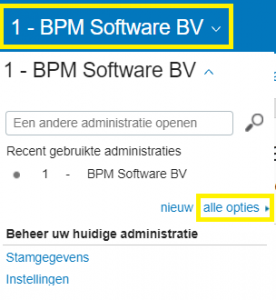
Step 2: The Exact Online dashboard is visible, then click on the administration name at the top left (see screenshot below).
Step 3: Click on all options
Step 4: A screen will open displaying an overview of the administration(s)
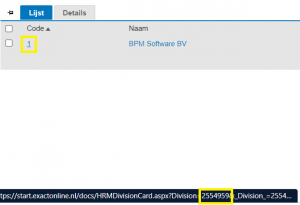
Step 5: In the “code” column, hover the mouse over the administration number. A URL will appear at the bottom, containing the Division Code.